
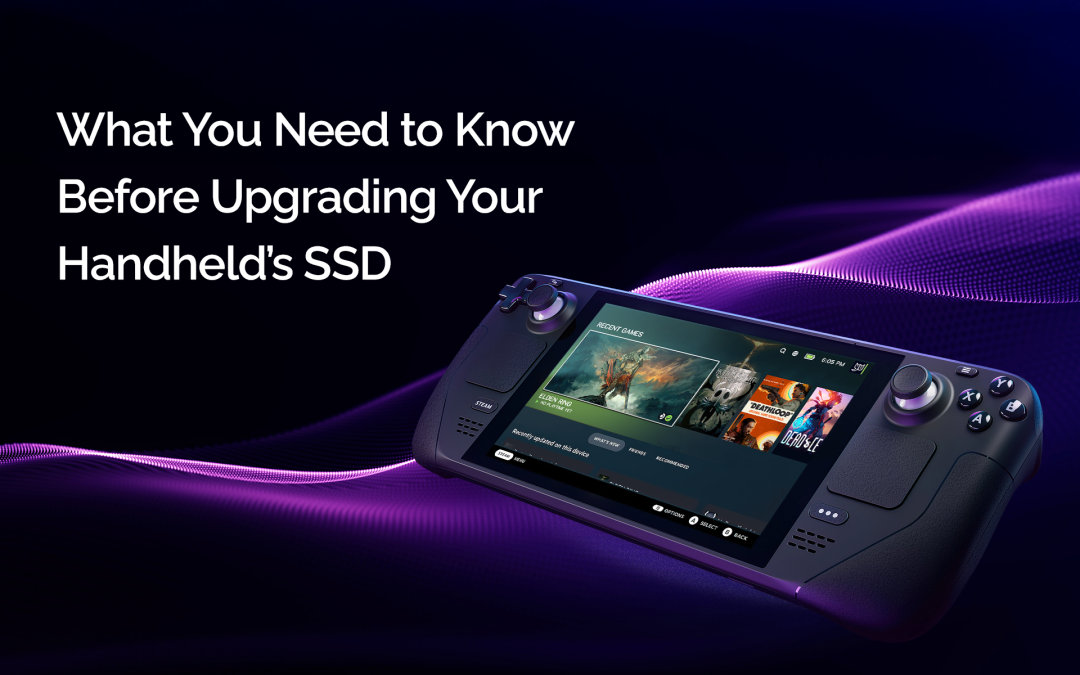
Wie Sie das richtige Laufwerk auswählen, Ihre Ladezeiten verkürzen und Ihr Handheld-Spielerlebnis wirklich mobil gestalten.
Besitzen Sie einen Steam Deck, ROG Ally oder einen anderen tragbaren Gaming-PC? Dann kennen Sie das Problem: Speicherplatzmangel. Die meisten Handhelds bieten 256 GB oder 512 GB SSD-Speicher – genug für eine kleine Sammlung von Indie-Titeln oder vielleicht ein, zwei große AAA-Spiele. Doch bei Installationen wie Cyberpunk 2077, die fast 90 GB groß sind, und Starfield mit über 125 GB ist der Speicherplatz schnell aufgebraucht.
Natürlich lässt sich der Speicherplatz mit einer microSD-Karte erweitern, und für viele Spieler ist das eine gute Übergangslösung. microSD-Karten sind jedoch langsam, weniger robust bei häufigem Schreiben und erreichen weder die schnellen Ladezeiten noch die Energieeffizienz einer echten NVMe-SSD. Wenn Ihr Gerät interne Aufrüstungen ermöglicht, wie beispielsweise das Steam Deck, ROG Ally oder Lenovo Legion Go, ist der Austausch der SSD eine der besten Möglichkeiten, Ihrem Handheld neues Leben einzuhauchen.
Dieser Leitfaden führt Sie durch die wichtigsten Aspekte bei der Auswahl der richtigen SSD – von Formfaktor und Schnittstelle bis hin zu Lebensdauer und Wärmeentwicklung. Er zeigt Ihnen außerdem, warum SSDs mit Phison-Prozessoren der Goldstandard für Gaming-Leistung auf Mobilgeräten sind.
Warum Sie ein SSD-Upgrade benötigen
Der Hauptgrund für ein SSD-Upgrade Ihres Handhelds ist zwar die Speichererweiterung, aber es geht auch um ein deutlich verbessertes Spielerlebnis. Schnellere Start- und Ladezeiten bedeuten, dass Sie früher spielen und weniger warten müssen. Spiele werden schneller installiert. Dateiübertragungen erfolgen blitzschnell. Selbst die Menünavigation und das Aufwachen aus dem Ruhemodus fühlen sich flüssiger an.
Je nach Gerät kann ein SSD-Upgrade einen deutlichen Unterschied machen. Der Wechsel von der Standardfestplatte zu einer High-End-NVMe-SSD spart nicht nur ein paar Sekunden, sondern kann die Ladezeiten bei größeren Spielen erheblich verkürzen. Es kann den Unterschied ausmachen zwischen “Wir holen uns schnell einen Snack, während das lädt” und “Oh, wir sind schon im Spiel!”
Moderne SSDs sind so konzipiert, dass sie energieeffizienter sind als ältere Laufwerke. Daher müssen Sie nicht zwischen Leistung und Akkulaufzeit abwägen – ein wichtiges Anliegen für mobile Gamer.
Auswahl eines zuverlässigen SSD-Controllers
Hinter jeder SSD steckt ein Controller, das “Gehirn”, das den Datenaustausch zwischen dem NAND-Flashspeicher und Ihrem Gerät steuert. Er bestimmt alles von der Geschwindigkeit und Zuverlässigkeit bis hin zur Lebensdauer Ihres Laufwerks. Deshalb ist die Wahl des Controllers genauso wichtig wie der Markenname.
Phison ist eines der wenigen Unternehmen, das eigene Controller entwickelt und direkt mit SSD-Herstellern zusammenarbeitet, um die Firmware für spezifische Arbeitslasten optimal anzupassen. Daher findet sich Phison-Technologie in einigen der vertrauenswürdigsten SSDs auf dem Markt – von Gaming-Laptops bis hin zu Unternehmensservern.
Mehrere Phison-Controller eignen sich besonders gut für tragbare Spielekonsolen:
-
-
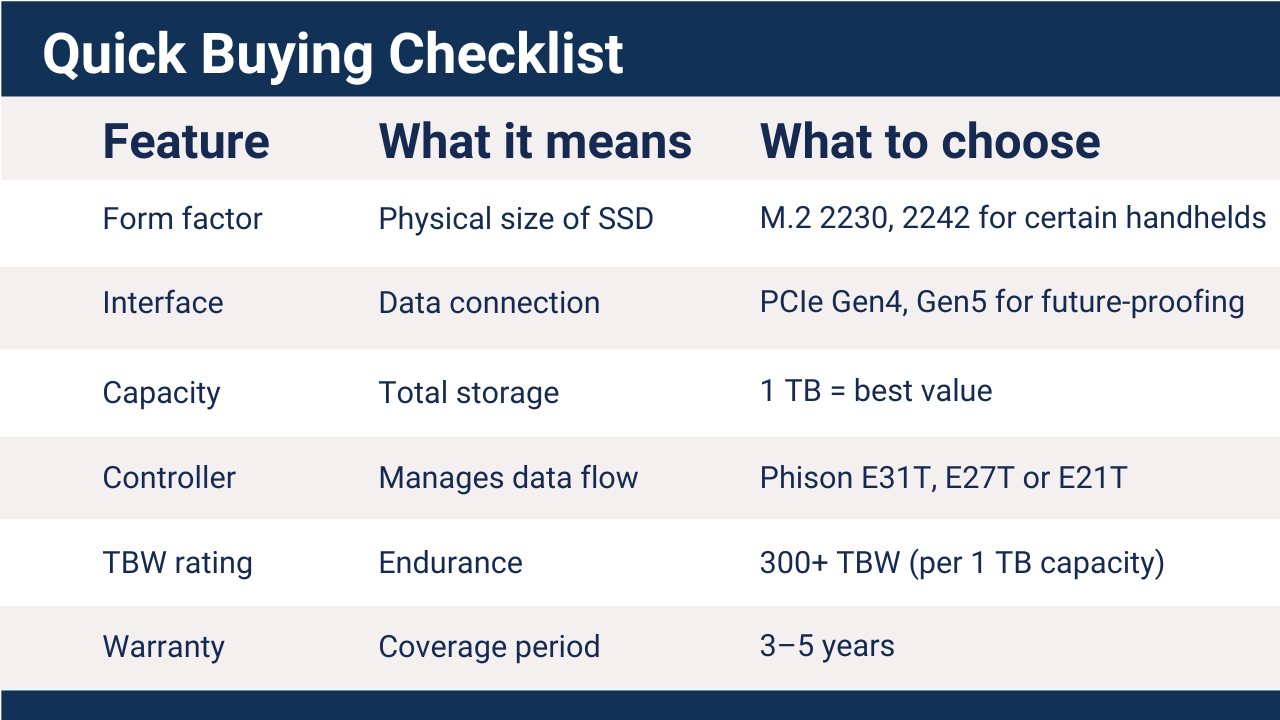
- Phison E31T – Ein leistungsstarker und energieeffizienter PCIe Gen5-Controller, der in SSDs der Desktop-Klasse verwendet wird, bereit für zukünftige Handheld-Geräte und hervorragend geeignet für bestehende Lösungen.
- Phison E27T – PCIe-Gen4-Controller der dritten Generation ohne DRAM, optimiert für die Formfaktoren 2230 und 2242, aber auch in 2280-Modellen einsetzbar. Bietet hervorragende Leistung und hohe Ausdauer, ideal für mobile Spielgeräte.
- Phison E21T Optimiert für schlanke NVMe-Designs ohne DRAM wie 2230-Laufwerke. Weit verbreitet, mit exzellenter Leistung pro Watt und hoher Lebensdauer – eine hervorragende Budget-Option für Handheld-Gaming-Upgrades.
-
Egal ob Sie auf Effizienz oder absolute Leistung Wert legen, SSDs mit Phison-Prozessoren bieten beides, mit einer Firmware, die auf Stabilität und Ausdauer auf Gaming-Niveau abgestimmt ist.
Kennen Sie Ihren Formfaktor: 2230, 2242 und größer
Wenn Ihre neue SSD nicht passt, spielt ihre Geschwindigkeit keine Rolle. Bevor Sie kaufen, sollten Sie wissen, welche SSD in Ihr Gaming-Handheld passt. SSDs gibt es in verschiedenen M.2-Formfaktoren, die sich auf die physische Länge und den Anschlusstyp beziehen. Der gängigste Formfaktor für Handhelds ist M.2 2230, was 22 Millimeter Breite und 30 Millimeter Länge bedeutet.
-
-
- Steam Deck, ROG Ally und MSI Claw verwenden alle NVMe M.2 2230-Laufwerke. Auch AYANEO, GPD Win und OneXPlayer verwenden typischerweise 2230.
- Legion Go verwendet 2242, überprüfen Sie aber immer das Datenblatt Ihres Modells.
- Es gibt zwar M.2 2242 auf 2230 Adapter, diese passen aber möglicherweise nicht in die Gehäuse einer tragbaren Spielkonsole.
- Nintendo Switch verwendet microSD-Karten als Benutzerspeicher. Zwar sind interne eMMC-Speichererweiterungen möglich, dies ist jedoch ein sehr komplexer Vorgang und führt zum Verlust der Garantie.
-
Dank des Aufstiegs von Handheld-PCs sind schnelle und leistungsstarke 2230-SSDs leichter denn je erhältlich. Vergewissern Sie sich jedoch, dass Sie nicht die gängigeren 2280- oder 2242-SSDs erwerben, die in Laptops und Desktop-PCs verbaut werden. Viele führende Hersteller bieten mittlerweile kompakte NVMe-Optionen mit Phison-Controllern an – derselben bewährten Technologie, die auch in High-End-Gaming-PCs und Enterprise-Systemen zum Einsatz kommt.
Den optimalen Punkt zwischen Geschwindigkeit und Kapazität finden
Es ist verlockend, den höchsten Leistungsdaten wie PCIe Gen5, 14 GB/s Lesegeschwindigkeit und mehreren Terabyte Speicherkapazität hinterherzujagen, doch Handhelds stoßen an ihre Grenzen. Das Steam Deck und ähnliche Geräte nutzen eine PCIe Gen3 x4-Schnittstelle. Selbst mit einer Gen4- oder Gen5-SSD erreicht man daher nicht die volle beworbene Geschwindigkeit. Gen4/Gen5-SSDs können jedoch dank neuerem Flash-Speicher und Controllern effizienter sein und sind vollständig abwärtskompatibel.
Der E27T-Controller von Phison ist beispielsweise für PCIe Gen4 NVMe SSDs konzipiert, die auch in Gen3-Geräten einwandfrei funktionieren. In einem Deck oder Ally bedeutet das einen exzellenten Datendurchsatz bei geringerem Stromverbrauch – ideal, um sowohl die Leistung als auch die Akkulaufzeit zu maximieren.
Wie groß sollte es werden?
-
-
- 512 GB reichen für Gelegenheitsspieler oder eine überschaubare Spielesammlung völlig aus.
- 1 TB ist derzeit die optimale Größe, sie bietet ein gutes Preis-Leistungs-Verhältnis und genügend Platz für ein Dutzend AAA-Titel.
- 2 TB ist eine High-End-Option für alle, die ihre gesamte Steam-Bibliothek unterwegs dabei haben möchten.
- 4-TB-Festplatten tauchen langsam auf, haben aber noch einen hohen Preis.
-
Bedenken Sie, dass selbst die schnellste SSD die Renderleistung einer Handheld-GPU oder die CPU-Geschwindigkeit nicht verbessern kann, aber sie kann die Ladezeiten von Levels fast halbieren und jede Interaktion reaktionsschneller gestalten.
Wärmeentwicklung und Akkulaufzeit: Mythen vs. Realität
Ein häufiges Problem beim Aufrüsten ist die Wärmeentwicklung, insbesondere bei kompakten Handhelds, wo jeder Millimeter zählt. Glücklicherweise sind moderne SSDs intelligenter denn je. Sie nutzen ein dynamisches Wärmemanagement und passen ihre Leistung temperaturabhängig an, um Überhitzung zu vermeiden.
Phisons E21T, E27T und E31T Die Controller verfügen über fortschrittliche Leistungsbegrenzungs- und Energiesparmodi, die den Stromverbrauch reduzieren, wenn nicht auf das Laufwerk zugegriffen wird. Anders ausgedrückt: Eine leistungsstarke SSD wird nicht zwangsläufig heißer oder entlädt den Akku schneller.
Praxistests zeigen, dass gut konfigurierte NVMe-SSDs die Akkulaufzeit bei längerem Spielen im Vergleich zu älteren, ineffizienten SSDs, die mehr Wärme erzeugen und den Lüfter auf Touren bringen, tatsächlich verlängern. Viele Modder verwenden sogar das originale Kühlblech weiter oder bringen ein dünnes Wärmeleitpad an, um den Kontakt und die Kühlung zu verbessern.
Worauf Sie bei Ausdauer, Firmware und Garantie achten sollten
Beim Vergleich von SSDs stößt man auf Spezifikationen wie TBW (Terabytes Written) und MTBF (mittlere Betriebsdauer zwischen Ausfällen). Diese Werte geben an, wie lange das Laufwerk intensive Lese-/Schreibzyklen verkraftet, was wichtig ist, wenn man häufig große Spiele installiert, löscht oder patcht.
Suchen:
-
-
- TBW-Wert von 300 TBW oder höher für ein 1-TB-Laufwerk
- Eine Garantie von mindestens drei Jahren, idealerweise jedoch fünf Jahre.
- Solide Firmware-Unterstützung, beispielsweise für Laufwerke auf Phison-Plattformen, die regelmäßig Firmware-Updates von ihren Markenpartnern erhalten, wodurch Kompatibilität und Leistung im Laufe der Zeit verbessert werden.
-
Eine gute SSD ist nicht nur schneller, sondern auch intelligenter, kühler und zuverlässiger.
Vorteile in der Praxis: Das Geschwindigkeitsgefühl
Zahlen sind schön und gut, aber was spürt man tatsächlich beim Spielen? Ein SSD-Upgrade kann spürbare Vorteile im Alltag bringen:
-
-
- Spiele wie Baldur's Gate 3 oder Elden Ring laden in weniger als der Hälfte der Zeit.
- Dateiübertragungen zu und von einem PC erfolgen deutlich schneller.
- Das Anhalten/Fortsetzen erfolgt blitzschnell und Ihr Mobilgerät ist sofort wieder spielbereit.
- Weniger thermische Drosselung bedeutet eine gleichmäßigere und anhaltende Leistung auch nach stundenlangem Spielen.
-
Für Entwickler, die Windows im Dual-Boot-Modus nutzen oder Emulatoren aus dem Store verwenden, ist der Unterschied enorm. Alles fühlt sich flüssiger, sauberer und schneller an.
Kurzkauf-Checkliste
Das Endergebnis
Das Aufrüsten der SSD Ihres Handhelds ist eine der wirkungsvollsten und überraschend einfachsten Modifikationen. Angesichts der stetig wachsenden Größe von AAA-Titeln und der Tatsache, dass microSD-Karten nicht mehr mithalten können, bietet ein internes NVMe-SSD-Upgrade die Geschwindigkeit, Kapazität und Effizienz, die mobiles Gaming verdient.
Ob Sie nun ein Bastler sind oder zum ersten Mal ein Upgrade vornehmen: Mit einer SSD von Phison läuft Ihr Mobilgerät kühler, lädt schneller und hat eine längere Akkulaufzeit. Denn wenn es um Leistung pro Watt und pro Millimeter geht, zählt jeder Controller-Zyklus.
Häufig gestellte Fragen (FAQ):
Warum ist ein Upgrade der internen SSD besser als die Verwendung einer microSD-Karte für Handheld-Spiele?
MicroSD-Karten sind durch geringere Bandbreite, schwächere Controller und reduzierte Ausdauer bei häufigen Schreibzyklen eingeschränkt. NVMe SSDs bieten einen deutlich höheren Datendurchsatz, geringere Latenz und eine bessere, dauerhafte Leistung. Interne SSD-Upgrades verbessern zudem die Systemreaktionsfähigkeit, beschleunigen die Spieleinstallation und das Verhalten beim Aufwachen aus dem Ruhezustand – Vorteile, die microSD-Speicher nicht bieten können.
Welcher SSD-Formfaktor ist für die meisten modernen Handheld-Spielekonsolen erforderlich?
Die meisten PC-basierten Handhelds verwenden M.2 2230 NVMe SSDs, Diese Steckplätze haben die Maße 22 mm x 30 mm. Einige Geräte unterstützen M.2 2242. Die physische Kompatibilität ist entscheidend, da größere Steckplätze wie 2280 nicht passen. Überprüfen Sie daher vor dem Kauf unbedingt die internen Spezifikationen des Geräts.
Hilft der Einbau einer PCIe Gen4- oder Gen5-SSD, wenn das Mobilgerät nur Gen3 unterstützt?
Ja. Zwar sind die sequenziellen Spitzengeschwindigkeiten durch die Gen3-Schnittstelle begrenzt, aber neuere Gen4- und Gen5-SSDs erreichen oft höhere Geschwindigkeiten. bessere Effizienz, geringerer Stromverbrauch und verbessertes Firmware-Verhalten. Sie sind abwärtskompatibel und bieten weiterhin reale Vorteile bei Ladezeiten und Dateivorgängen.
Welche Speicherkapazität ist heutzutage ideal für Handheld-Spiele?
Für die meisten Nutzer, 1 TB bietet das beste Verhältnis von Kosten und Benutzerfreundlichkeit und unterstützt mehrere AAA-Titel gleichzeitig.
512 GB reichen für kleinere Bibliotheken aus, 2 TB Geeignet für Nutzer mit großen Spielesammlungen oder Dual-Boot-Systemen. Bei der Wahl der Speicherkapazität sollten folgende Aspekte berücksichtigt werden: installieren Größen, Patch-Frequenz und Langzeitnutzung.
Beeinträchtigen SSD-Upgrades die Akkulaufzeit oder die Wärmeentwicklung?
Nein, bei Verwendung moderner Controller. Neue Generation NVMe SSDs verfügen über Leistungsbegrenzung, Energiesparmodi und thermische Drosselung. In vielen Fällen reduzieren effiziente SSDs die Wärmeentwicklung und stabilisieren den Akkuverbrauch im Vergleich zu älteren oder schlecht optimierten Laufwerken.
Warum ist der SSD-Controller wichtiger als die beworbene Geschwindigkeit?
Der Controller steuert Datenfluss, Verschleißverteilung, Energiesparmodi und Wärmeentwicklung. Ein gut konzipierter Controller gewährleistet konstante Leistung, Stabilität unter hoher Gaming-Last und lange Lebensdauer. Die Spitzengeschwindigkeit allein sagt nichts über die tatsächliche Gaming-Performance oder Zuverlässigkeit aus.
Welche Phison-Controller eignen sich am besten für tragbare Gaming-SSDs?
Phison bietet mehrere Controller an, die für kompakte NVMe-Designs optimiert sind:
- E21THohe Effizienz, kein DRAM, ideal für 2230-Formfaktoren und kostengünstige Upgrades
- E27TPCIe Gen4, hervorragende Ausdauer und Leistung pro Watt für Handheld-Spiele
- E31TPCIe Gen5-fähiger, zukunftsorientierter Controller für Plattformen der nächsten Generation
Jedes Ziel ist ein geringer Stromverbrauch, eine dauerhafte Leistungsfähigkeit und eine stabile Firmware.
Auf welche Ausdauerspezifikationen sollten Gamer bei einer SSD achten?
Ausdauer wird gemessen durch TBW (Terabytes geschrieben). Für eine 1-TB-Festplatte, 300 TBW oder höher wird empfohlen. Dies gewährleistet Zuverlässigkeit bei wiederholten Spielinstallationen, Updates und Dateiübertragungen. Firmware-Reife und Controller-Qualität sind gleichermaßen wichtige Faktoren.
Wie beeinflusst die SSD-Firmware die Leistung von Handheld-Spielen?
Die Firmware steuert Temperaturregelung, Energieeffizienz, Kompatibilität und Fehlerbehandlung. SSDs, die auf ausgereiften Controller-Plattformen basieren, profitieren von der kontinuierlichen Firmware-Optimierung durch OEM-Partner, wodurch die Stabilität unter verschiedenen Betriebssystemen und Gaming-Workloads im Laufe der Zeit verbessert wird.
Wie passen Phison-basierte SSDs zu den Anforderungen portabler Spielekonsolen?
Phison entwirft Controller mit Leistungsoptimierung pro Watt, kompakte Bauformen und arbeitslastspezifische Firmware-Optimierung Dies macht sie ideal für mobile Spielgeräte, bei denen Platz, Wärmeentwicklung und Akkulaufzeit stark eingeschränkt sind und gleichzeitig eine gleichbleibende Leistung der NVMe-Klasse geboten wird.






 Deutsch
  English
  繁體中文
繁體中文  简体中文
简体中文  日本語
日本語  한국어
한국어